Blogger news

Friday, 13 December 2013

Fastest Method to Root any Android Phone Without a Computer


Rooting an android phone can be a time taking process . Today we are going to show you the Fastest way to Root almost any android phone without a computer .

Root android phone without computer Fastest Method to Root any Android Phone Without a Computer
Framaroot is a one click application that roots almost any android phone or device without the need of a Computer . Framaroot was developed by alephzain from The XDA forums . With one click this app can install the Superuser and Su binary on your phone . Framaroot currently supports phones with Android versions from 2.0 to 4.2 . This is one of the easiest and fastest rooting methods .

Framaroot user six major and safe exploits to root your android phone . which are Gandalf , Boromir ,Sam, , Frodo , Aragorn and Gimli . I know you must be thinking from where did these characters from The Lord of the rings came into the world of Android .  these exploits must have been discovered by A LOTR  fan .

Everybody with an Android phone has got into a dilemma of whether to root their phone or not to . While The advantages of rooting are many but a single mistake can make your device an instant paperweight . Rooting an Android phone helps unlocks the many restrictions and unleash the full performance of a phone . After all you’ve paid with your hard earned money and you need to experience the best out of your Android device .
Since most manufacturers take a lot of time to release firmware updates on their android devices . You can use your rooted phone to enjoy custom roms with the latest version of android and many exciting features much before its is officially available on your phone .You can install the app in your android device and check out if it works  , The app wont brick your phone as it does not touch your kernel , nor flash anything .
IMPORTANT!  : Rooting your device will VOID your Android phone’s WARRANTY ! . I will not be responsible in any way .

Steps to root you android phone without a computer .

  • Step 1: Download the Framaroot app to your phone or computer from here
  • Step 2: Copy Framaroot from your computer to your phone memory.
  • Step 3: Install Framaroot from the apk file.
  • Step 4: Choose “install Superuser”  option inside Framaraoot.
  • Step 5: Select any of the exploits that appears in the app and wait for some time.
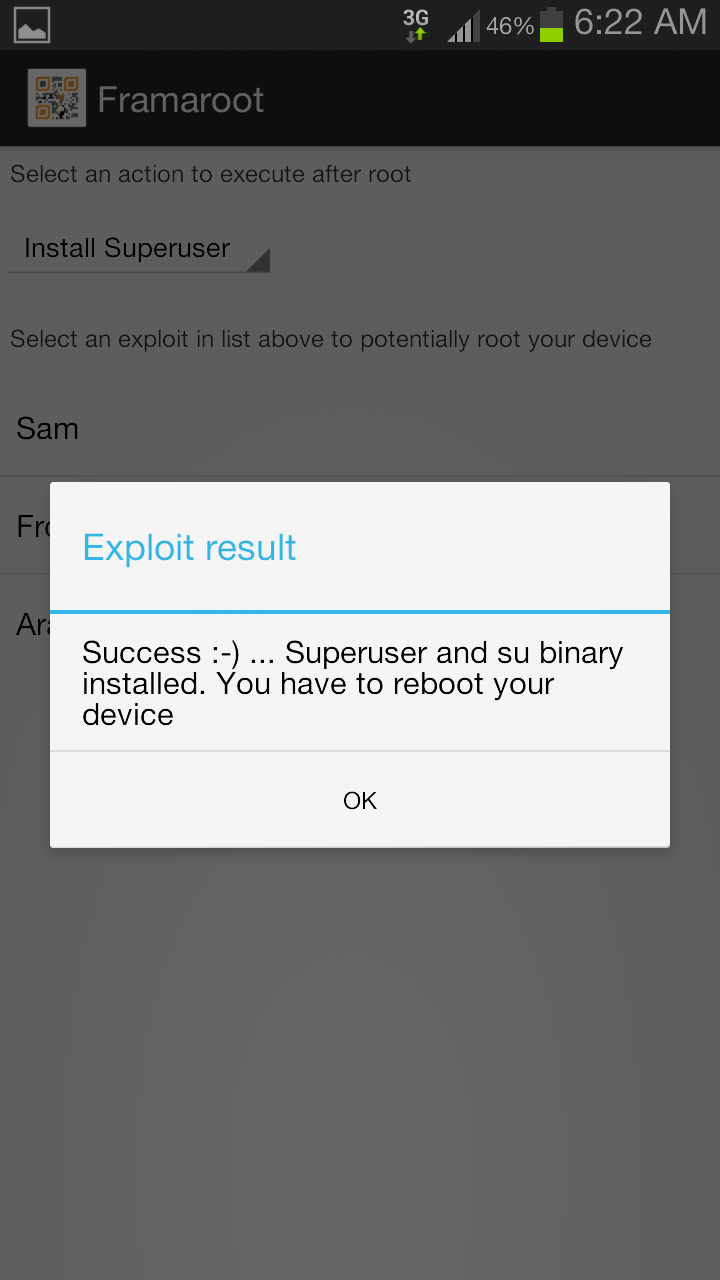
  • Step 6: If you see a “Success  … Superuser and su binary installed. You have to reboot your device” message then you have successfully rooted your phone .
  • Step 7: If you see “Failed … Try another exploit if available”  message then try selecting another exploit .
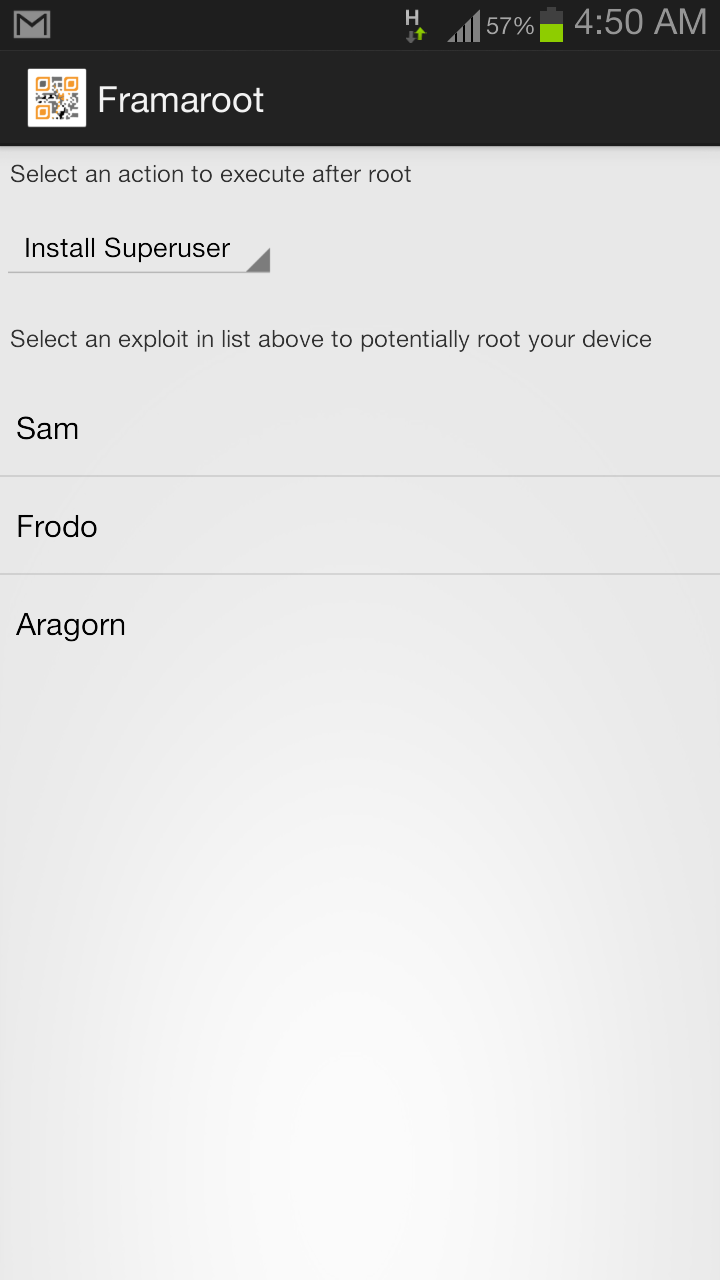

Screenshot 2013 07 28 04 50 12 Fastest Method to Root any Android Phone Without a Computer
         
Screenshot 2013 08 01 06 22 20 Fastest Method to Root any Android Phone Without a Computer


Uk Top Chart


 The Best OF SONGS in UK TOP CHART OCTOBER
  Single link(through mediafire)  :--- http://adf.ly/Wqj9i
 Please inform on broken links 
 For any Feedback , comment below or tweet me on Twitter @5aksh 

Nba 2K14 for pc

NBA 2K14 - www.blackboxrepack.com
Developer: Visual Concepts
Publisher: 2K Sports
Genre:  Sport
Platform: PC
Release Date: 01 October 2013
Language: English
Media Size: 4.9GB
Suggested system requirements: Core 2 Duo 2.2 GHz, 2 GB RAM, graphic card 512 MB (GeForce 8800 GT or better), 9 GB HDD, Windows XP(SP3)/Vista(SP2)/7(SP1)/8
Screenshot:  http://adf.ly/WnGJe ,http://adf.ly/WnGW

NBA 2K14 will raise the bar yet again, providing the best basketball gaming experience for legions of sports fan and gamers around the world.Euroleague – Exclusive to NBA 2K14 – play with 14 of the top European teams, featuring authentic uniforms and players. Dynamic Living Rosters powered by Stats, Inc. – Player attributes and tendencies automatically update daily to reflect true life hot and cold streaks. Now, each game played in the NBA can have an effect on your game. King James Soundtrack – Featuring artists and tracks hand-picked by LeBron James, including JAY Z, Eminem, The Black Keys, Daft Punk, and many more. 


The links are below:::::::::---------
 Password :::::-------       www.blackboxrepack.com
 Billion Uploads______http://adf.ly/WnHKn
 Uploaded__________http://adf.ly/WnHUx
 Putlocker__________http://adf.ly/WnHjY

Install latest 4.xx CFW PS3

Follow me on twitter @5aksh

Useful Tools:
Latest multiMAN (4.50.01)
eEID Root Key Dumper
Latest PPC+
Latest Showtime (4.2)
Latest mmTOOLS (4.50)
Latest reActPSN (v2.27)
  Here are my guides for installing the latest 4.xx CFWs on your PS3: If you're on OFW higher than 3.55, you CAN'T install CFW directly! You need to check if your model is old enough to be hackable (older than June 2011). If you're lucky enough and it is hackable, you can use a hardware flasher (NOR Guide | NAND Guide) to dump your 3.56+ flash, patch it and re-flash it before you can install CFW using the guides below. If you're already on CFW, you can always start with the 2 (optional) steps below before installing the CFW of your choice:
  • Dump your NOR/NAND Flash: Install latest version of multiMAN CEX, plug in a FAT32 formatted USB flash drive into the right USB port, launch multiMAN under the Game column and go to mmOS > Press on any file > Open in HEX viewer > Press SELECT > Press START > Export GameOS LV2: Select No > Export HV LV1: Select No > Export FLASH: Select Yes This creates a backup of your NOR/NAND flash so that you can recover using a hardware flasher in case of a (highly unlikely) brick. It is recommended to do it every time you upgrade/downgrade your CFW just in case something goes wrong.
  • Dump your eEID Root Key: This has to be done only once, while (and if) still on 3.55 CFW, just in case you want to ever switch to DEX in the future without having to downgrade back to 3.55 CFW to dump it. Install eEID_RKDumper.pkg > Unplug all USB devices > Launch eEID RKDumper under the Game column. It will black screen for 10-15 seconds, beep 3 times and reboot automatically. Now FTP to your console and retrieve your Root Key/PCK1 from /dev_hdd0/tmp/eid_root_key (48 bytes). Once you retrieve your Root Key, you can delete eEID RKDumper from your XMB as it is not needed anymore.
Rebug 4.46.1 LITE: This CFW can only be installed on top of CEX. If you're on DEX, you have to convert to CEX before you can install this CFW. If you don't know what DEX is, you're most likely on CEX. If you're on 3.55 or lower OFW, or a hardware flasher patched 3.56+ OFW, or any 4.46 or lower CFW, you can install Rebug 4.46.1 LITE from XMB by following the guide below:
1- Install Rebug 4.46.1 LITE from XMB: Download Rebug 4.46.1 LITE from Rebug's website, verify the md5 hash with @DEFAULTDNB 's PPC+, rename the PUP to PS3UPDAT.PUP, put it on your FAT32 formatted flash drive in PS3\UPDATE, go to System Update and Update via Storage Media. Make sure there's NO original game disk in the drive, NO game is mounted and that you DON'T Update via Internet or else you would risk installing OFW >3.55! 2- Enable QA: Go to Package Manager > Install Package Files > PS3 Hard Disk and install Rebug Toolbox. Launch it under the Game column, go to Utilities and change Toggle QA Flag to Enabled. This is to ensure easier and safer downgrading. Notes:
  • OFW 4.50 has been released, make sure you don't accidentally update. You also need a spoofer to connect to PSN (with ban risk).
  • Make sure you use mM 4.46.00 or higher because older versions are not compatible with this CFW.
  • Make sure you install the Rebug Toolbox pkg included inside Package Manager because older versions are not compatible with this CFW.
  • Make sure you use reActPSN v2.27 or higher because older versions might not be fully compatible with this CFW.
Rebug 4.46.1 REX/D-REX: If you're on CEX you have to install the REX Edition. If you're on DEX, you have to install the D-REX Edition. If you're on 3.55 or lower OFW, or a hardware flasher patched 3.56+ OFW, or any 4.46 or lower CFW, you can install Rebug 4.46.1 REX/D-REX from XMB by following the guide below:
1- Install Rebug 4.46.1 REX/D-REX from XMB: Download Rebug 4.46.1 REX/D-REX from Rebug's website, verify the md5 hash with @DEFAULTDNB 's PPC+, rename the PUP to PS3UPDAT.PUP, put it on your FAT32 formatted flash drive in PS3\UPDATE, go to System Update and Update via Storage Media. Make sure there's NO original game disk in the drive, NO game is mounted and that you DON'T Update via Internet or else you would risk installing OFW >3.55! 2- Enable QA: Go to Package Manager > Install Package Files > PS3 Hard Disk and install Rebug Toolbox. Launch it under the Game column, go to Utilities and change Toggle QA Flag to Enabled. This is to ensure easier and safer downgrading. Notes:
  • OFW 4.50 has been released, make sure you don't accidentally update. You also need a spoofer to connect to PSN (with ban risk).
  • Make sure you use mM 4.46.02 or higher because older versions are not compatible with this CFW.
  • Make sure you install the Rebug Toolbox pkg included inside Package Manager because older versions are not compatible with this CFW.
  • Make sure you use reActPSN v2.27 or higher because older versions might not be fully compatible with this CFW.
Rogero 4.46 v1.01: This CFW can only be installed on top of CEX. If you're on DEX, you have to convert to CEX before you can install this CFW. If you don't know what DEX is, you're most likely on CEX. If you're on 3.55 or lower OFW, or a hardware flasher patched 3.56+ OFW, or any 4.46 or lower CFW, you can install Rogero 4.46 v1.01 from XMB by following the guide below:
1- Install Rogero 4.46 v1.01 from XMB: Download Rogero 4.46 v1.01 from tortuga-cove, verify the md5 hash with @DEFAULTDNB 's PPC+, rename the PUP to PS3UPDAT.PUP, put it on your FAT32 formatted flash drive in PS3\UPDATE, go to System Update and Update via Storage Media. Make sure there's NO original game disk in the drive, NO game is mounted and that you DON'T Update via Internet or else you would risk installing OFW >3.55! Notes:
  • OFW 4.50 has been released, make sure you don't accidentally update. You also need a spoofer to connect to PSN (with ban risk).
  • QA is enabled by default on this CFW.
  • Make sure you use mM 4.46.00 or higher because older versions are not compatible with this CFW.
  • Make sure you use reActPSN v2.27 or higher because older versions might not be fully compatible with this CFW.
HABIB 4.50 V1.01: [INSTALL AT YOUR OWN RISK] This CFW can only be installed on top of CEX. If you're on DEX, you have to convert to CEX before you can install this CFW. If you don't know what DEX is, you're most likely on CEX. If you're on 3.55 or lower OFW, or a hardware flasher patched 3.56+ OFW, or any 4.50 or lower CFW, you can install HABIB 4.50 V1.01 from XMB by following the guide below:
1- Install HABIB 4.50 V1.01 from XMB: Download HABIB 4.50 V1.01 from tortuga-cove, verify the md5 hash with @DEFAULTDNB 's PPC+, rename the PUP to PS3UPDAT.PUP, put it on your FAT32 formatted flash drive in PS3\UPDATE, go to System Update and Update via Storage Media. Make sure there's NO original game disk in the drive, NO game is mounted and that you DON'T Update via Internet or else you would risk installing OFW >3.55! Notes:
  • This CFW is built from OFW 4.50, so it prevents accidental updates to OFW >3.55 and allows PSN access (with ban risk) without the need for a spoofer.
  • QA is not enabled by default on this CFW. Enable QA before installation.
  • Make sure you use mM 4.50.00 or higher because older versions are not compatible with this CFW.

  • Make sure you use reActPSN v2.27 or higher because older versions might not be fully compatible with this CFW.

© 2013 TechWorld. All rights resevered. Share on Blogger Template Free Download.